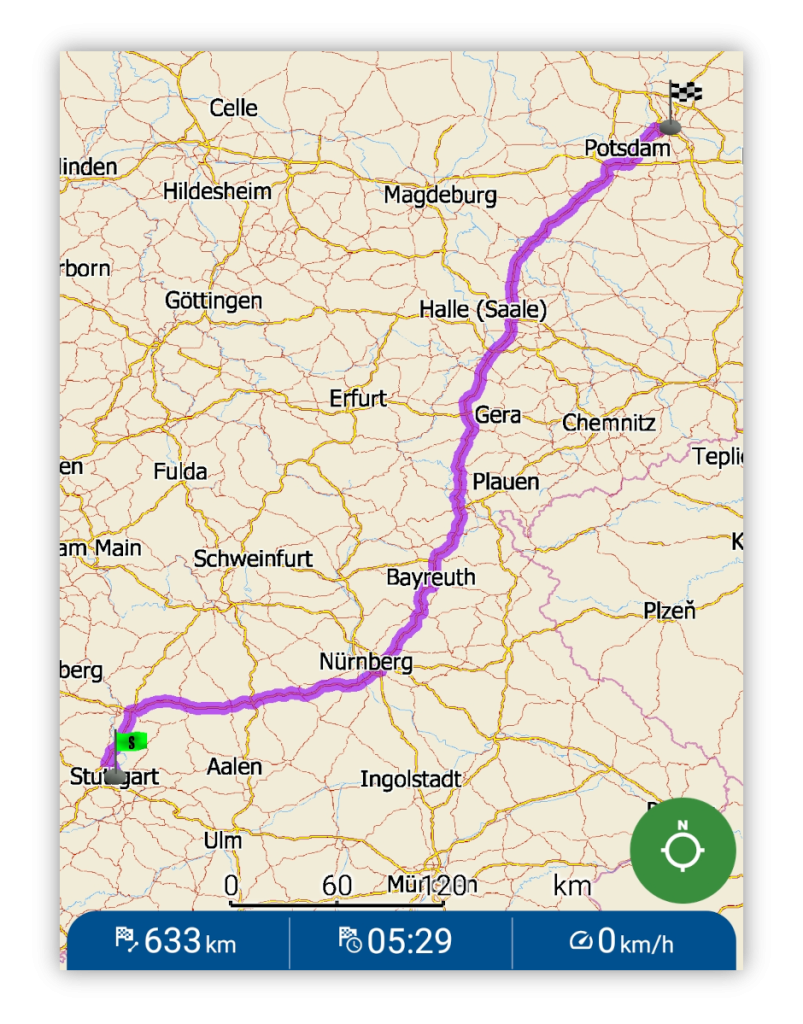
MapFactor Navigator – Offline GPS Navigation App

MapFactor Navigator is an offline GPS navigation app for Android, iOS, Windows and WinCE, designed for reliable route planning and voice-guided navigation across a wide range of vehicle types — from cars and motorcycles to buses, motorhomes and trucks, as well as for pedestrians and cyclists.

Reliable navigation for all-type travellers

MapFactor Navigator is a navigation app designed for drivers, travellers and professional users who need reliable navigation for everyday driving, travel and work. It combines offline maps, route planning and voice-guided navigation into a practical solution for daily use, travel and professional driving.

The app is available across multiple platforms, allowing users to navigate seamlessly on different devices.

Navigator is available as a free navigation app and can be extended with premium features, professional TomTom® maps, or upgraded to Navigator Pro.
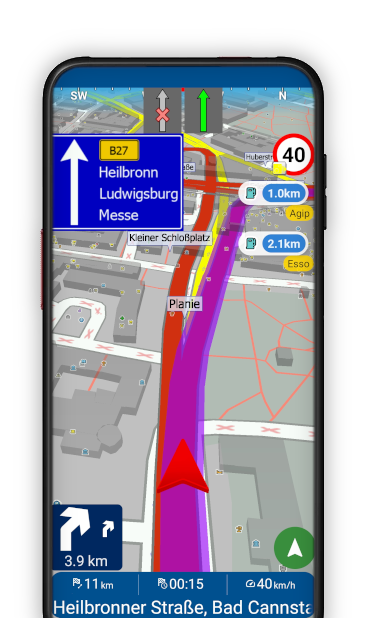

Mapfactor Navigator for Android Offline GPS Navigation

Key Features

MapFactor Navigator combines powerful navigation tools with reliable offline maps to help drivers and travellers navigate safely and efficiently. The app includes features designed for everyday use as well as professional navigation.

Offline Navigation

Download maps to your device and navigate reliably even without an internet connection.

Voice-Guided Navigation

Clear turn-by-turn voice instructions help you follow your route safely while driving, walking or cycling.

Route Planning Options

Choose between fastest, shortest or cheapest routes. Plan and optimise routes with multiple waypoints.

Speed & Camera Alerts

Warnings about speed limits and fixed speed cameras help improve driving awareness.

Truck Navigation

Truck-specific routing based on vehicle dimensions, weight and road restrictions.

Multi-Platform Support

Use MapFactor Navigator on Android, iOS, Windows and WinCE devices.

Advanced Navigation Features

Enhance MapFactor Navigator with additional tools for smarter routing, real-time information and convenient in-car navigation.

  • HD Traffic information – real-time traffic updates help you avoid congestion.*

  • Alternative Routes – choose from up to three different routes and select the one that suits you best.*

  • Head-Up Display (HUD) – project navigation information onto the windshield for safer driving.*

  • Lane Assistant – clear lane guidance at complex junctions.

  • Android Auto & Apple CarPlay support – connect Navigator to your car display.

  • Nearby POI along your route – easily find petrol stations, restaurants, parking or other POI along your route.

  • Custom Colour Schemes – personalise the app* and map interface.

  • Remote commands for integration with telematics systems — send routes, control navigation and communicate with drivers.

* Available as a premium feature.

MapFactor Navigator for iOS on an iPhone, map

Who Uses Our App?

With more than 50 million downloads worldwide, MapFactor Navigator is trusted by drivers and travellers who rely on clear and reliable GPS navigation — from everyday driving to professional use.

Everyday Drivers

Reliable navigation for commuting, daily trips and travelling to new places.

Professional Drivers

Navigation for delivery drivers, taxi drivers and other professionals who rely on accurate routing.

Truck Drivers

Specialised truck routing and maps designed for large vehicles.
→ Learn more about truck navigation

Travellers & Cyclists

Simple navigation for exploring cities and travelling on foot, by bike or on a motorcycle.

Fleet Operators & System Integrators

Integration of Navigator into fleet management and telematics systems using simple remote commands – for example for sending routes and controlling navigation directly from your system. Maps & Navigation SDK offers deeper integration of offline maps, routing and navigation features directly into your own application.

Offline Navigation vs Online Navigation

GPS navigation apps help users plan routes, find destinations and reach them safely. Many navigation apps rely on online maps and require a constant internet connection.

With offline GPS navigation, maps are stored directly on the device, allowing users to navigate without mobile data. This makes offline navigation more reliable in areas with poor signal, when travelling abroad or while roaming.

MapFactor Navigator is designed as an offline GPS navigation app, allowing users to download maps and navigate reliably anytime, anywhere.
Plan and follow your route even without mobile data, using downloaded offline maps.

Available platforms

Android

Navigation for Android smartphones and tablets.

iOS

Navigation for iPhone and iPad devices.

Windows and WinCE

Navigation for Windows PCs, tablets and navigation devices.

MapFactor Navigator Versions

MapFactor Navigator is available in several versions, depending on your navigation needs.
Start with the free navigation app, extend it with optional add-ons, or choose the all-in-one Navigator PRO version with premium features included.

MapFactor Navigator
Free as you go
Free offline GPS navigation with OpenStreetMap maps
Route planning and voice-guided navigation
Intuitive turn-by-turn navigation
Supports cars, pedestrians, cyclists and motorcycles
Available for Android, iOS, Windows
Android Auto, Car Play
MapFactor Navigator PRO
All-in-One Solution
All features of free version plus:
TomTom Car or Truck maps included
Real-time HD traffic
All Add-Ons included
Monthly or yearly subscription with map updates
Available as Car Pro or Truck Pro versions
Available for Android and iOS
Optional Add-Ons
Pick what suits your needs
Available in free version
Premium features (Alternative Routes, HUD, App colour schemes)
HD traffic (real-time traffic updates)
Professional TomTom offline maps
Truck navigation with TomTom Truck maps
Online search
Remote commands

Offline Map Sources

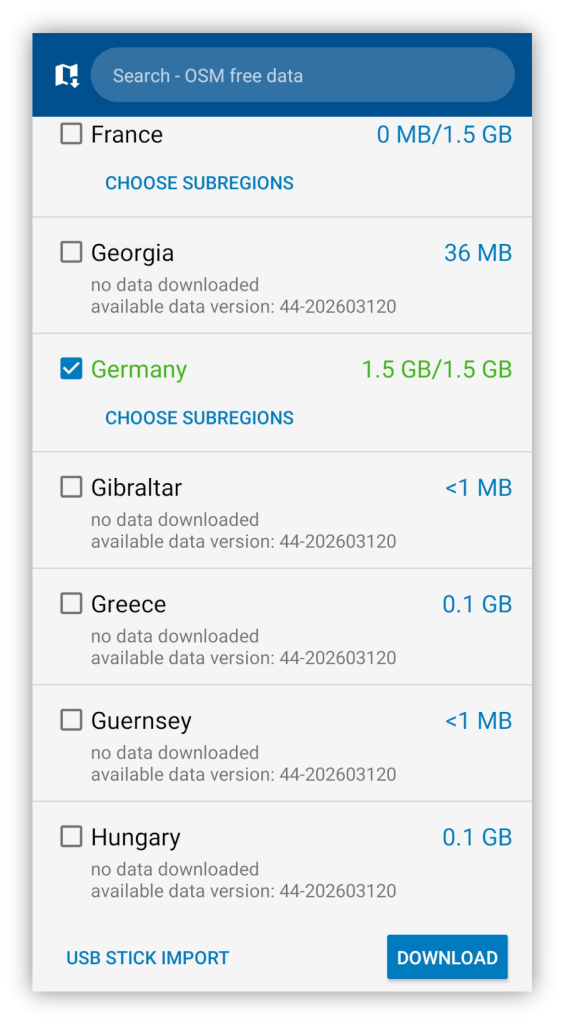
MapFactor Navigator offers two types of offline maps downloadable offline maps, allowing reliable navigation without an internet connection.
Maps can be downloaded for entire countries or regions and stored directly on your device — in internal storage or on an SD card — with regular updates.

MapFactor navigator - download offline maps

Free maps by OpenStreetMaps

The free version of Navigator uses maps based on the OpenStreetMap project, created by volunteers around the world. These maps are updated every month and provide broad global coverage.

tomtom

professional maps

Navigator also supports professional maps created by TomTom® available as an optional upgrade or included in Navigator PRO.

  • More precise and consistent map coverage.
  • Enhanced information for more accurate and reliable navigation and routing.    
  • Specialised maps for trucks, buses and motorhomes


TomTom® maps are updated
quarterly.

MapStick (USB drive) offers an easy offline map import into Navigator PRO Android app.

Why Choose MapFactor Navigator

MapFactor Navigator combines reliable offline navigation, flexible route planning and high-quality maps in one solution available across multiple platforms. With more than 50 million downloads worldwide, Navigator is trusted by millions of users who rely on clear and dependable navigation every day.

Key Advantages

Reliable offline navigation

Navigate confidently with downloadable maps even without an internet connection.

Choice of navigation maps

Use free OpenStreetMap maps or upgrade to professional TomTom® navigation maps.

Flexible navigation for different vehicles

Use Navigator for pedestrians, cyclists, motorcycles, cars, motorhomes, buses and trucks.

Available across multiple platforms

Use MapFactor Navigator on Android, iOS, Windows and WinCE devices.

Frequently Asked Questions

Yes. MapFactor Navigator supports offline GPS navigation using downloadable maps stored directly on the device, allowing navigation even without an internet connection.

Yes. MapFactor Navigator is available as a free navigation app with OpenStreetMap maps.
Additional features, TomTom navigation maps and traffic information are available as optional upgrades or as part of Navigator Pro.

MapFactor Navigator is available for Android, iOS and Windows, allowing navigation on smartphones, tablets, PCs and dedicated navigation devices.

The free version uses OpenStreetMap maps, which are updated monthly.
Professional TomTom® navigation maps are also available as an upgrade or included in Navigator Pro.

Yes. Navigator also supports truck navigation with specialised truck maps and routing designed for large vehicles.

Need more help?
Find detailed guides, manuals and troubleshooting tips on the MapFactor Support website.
➡ Go to MapFactor Support Website

Get MapFactor Navigator

MapFactor Navigator Pro

All-in-one navigation with TomTom® maps, real-time traffic information and premium features. Available for Android and iOS.

Navigator Car Pro

Pro maps and all great features for Android users

Navigator Truck Pro

Pro maps and all features for Android users with truck related benefits

Navigator Truck/Car Pro

Pro maps and all features for iOS users with truck related benefits

MapFactor Navigator Free

Start with the free GPS navigation app with offline OpenStreetMap maps.

Navigator for Android

Navigator for iOS

Navigator for Windows

MapFactor Navigator for Windows & WinCE

MapFactor Navigator is also available as offline GPS navigation software for Windows PCs, laptops, tablets and dedicated PDA navigation devices.

Available Windows and WinCE versions:

PC/Pocket Navigator Free (OpenStreetMap maps) – Download Navigator Free for Windows (Setup Utility Installer)
PC/Pocket Navigator Standard (TomTom® Standard maps for cars) – Buy PC /Pocket Navigator Standard
PC/Pocket Navigator Truck (specialised TomTom® Truck maps, truck-optimised routing and navigation) – Buy PC/Pocket Navigator Truck