Blog
GPS navigace na dovolenou - MapFactor Navigator naviguje po silnici podél pobřeží

8 Navigation Features That Make Travelling Easier

Whether you’re driving across the country, exploring a new city on foot, riding a motorcycle through scenic roads, or picking up a rental car after landing at your destination, reliable navigation can make travelling easier, safer, and less stressful.

Modern navigation apps do much more than simply guide you from point A to point B. If you’re looking for the best navigation app for travel, features such as offline maps, route planning, traffic information, speed camera alerts, and points of interest along your route can make a significant difference.

Here are eight navigation features worth checking before your next journey.

Try MapFactor Navigator for Free

Offline maps, route planning, points of interest along the way and other useful features for your trips.

1. Offline Maps – Navigation Wherever You Travel

Many travellers rely on a constant internet connection. While mobile networks are widely available in many regions, there are still situations where connectivity can be limited, expensive, or unavailable.

Offline maps remain available wherever you travel, without depending on mobile coverage or data connectivity. They can be especially useful when travelling abroad, exploring remote areas, crossing borders, or visiting regions with unreliable network coverage.

Offline maps are valuable not only while driving. After arriving at your destination, they can help you navigate unfamiliar cities, find restaurants, explore local attractions, or follow walking routes without worrying about connectivity.

Downloading maps before your trip takes only a few minutes and can make your entire journey more convenient.

Did you know?

With MapFactor Navigator, you can download maps for individual countries in advance and use them completely offline. Choose between free OpenStreetMap maps and professional TomTom® map data.
Specialised navigation solutions are also available for motorhomes, campervans, buses and trucks, allowing route calculations that consider vehicle dimensions and restrictions.
→  More on maps in Navigator

MapFactor navigator icon 256x256px

2. Plan Your Route in Advance

Whether you’re taking a weekend road trip or travelling hundreds of miles across several states or countries, planning ahead can make your journey more comfortable.

Modern navigation apps allow you to create routes with multiple stops and waypoints. You can plan fuel stops, charging stations, restaurants, sightseeing locations, accommodations, or rest areas before you start travelling.

Preparing your route in advance reduces the need for last-minute decisions and helps you focus on the journey itself.

Did you know?

MapFactor Navigator lets you save not only favorite locations but also complete routes, including waypoints and planned stops.
→  More about favourite routes

MapFactor navigator icon 256x256px

3. Find Fuel, Charging Stations, Restaurants, and Other Places Along the Way

Long journeys often involve more than simply following a route. You may need fuel, food, parking, charging stations, rest areas, hotels, or other services along the way.

Modern navigation apps can help you find points of interest (POIs) near your route, making it easier to plan breaks and avoid unnecessary detours.

Even more convenient is the ability to continuously display nearby places of a selected category while navigating.

Did you know?

MapFactor Navigator allows you to choose which category of places you want to monitor during navigation, including fuel stations, EV charging stations, restaurants, parking areas, rest stops, accommodations, or any other POI category available in the map. Nearby locations are continuously displayed during the navigation, and any selected stop can be added to your route with a single tap.
→  More about nearby POI along your route

MapFactor navigator icon 256x256px
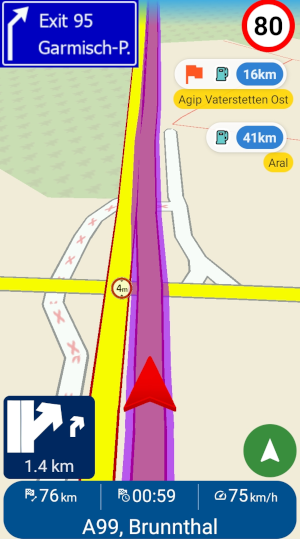
Navigator 8 - navigation screen: nearby POI added as waypoint
MapFactor Navigator displays information about the nearest POIs along the route, e.g. fuel stations

4. Voice Guidance and Lane Assistance

Constantly checking your phone while travelling is neither comfortable nor safe.
Clear voice guidance helps you stay focused on the road, while timely instructions ensure that you don’t miss important turns or exits.

Lane assistance can be especially helpful in busy cities, at complex intersections, motorway interchanges, and unfamiliar road networks. Being in the correct lane at the right time can help reduce stress and prevent unnecessary detours.

5. Speed Camera and Speed Limit Alerts

When travelling through unfamiliar regions or countries, keeping track of changing speed limits and enforcement zones can be challenging.

Navigation systems that provide speed camera and speed limit alerts can help drivers remain aware of local regulations and maintain safer driving habits.

Did you know?

MapFactor Navigator supports alerts for fixed speed cameras. Visual and sound notifications are available, and you can choose how far in advance you would like to receive warnings. The app can also alert you when you exceed the current speed limit.
→  More on speed cameras and alerts

MapFactor navigator icon 256x256px

6. Android Auto and Apple CarPlay for More Comfortable Navigation

Many travellers prefer using navigation directly on their vehicle’s display.

Android Auto and Apple CarPlay allow navigation apps to be displayed on larger screens, providing better visibility and easier control while driving.

This can make longer journeys more comfortable and help reduce distractions caused by frequently checking a smartphone.

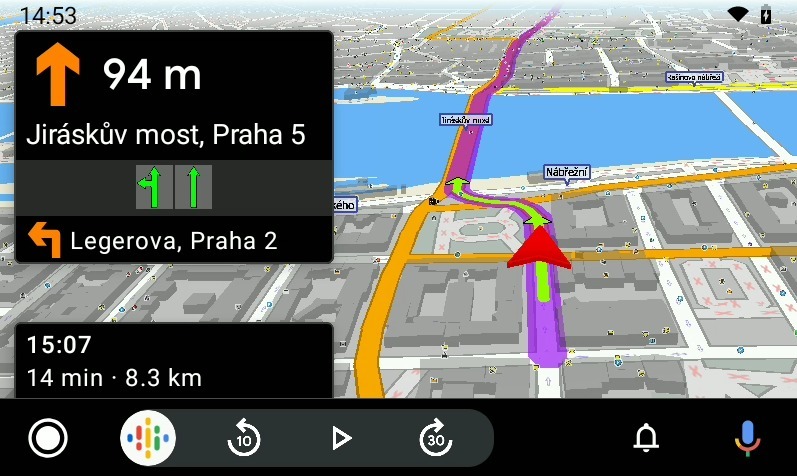
Mapfactor Navigator on Android Auto display
Navigator app on Android Auto screen

7. Keep Your Maps Up to Date

Road networks are constantly changing. New motorways, bypasses, roundabouts can all affect your journey.

Keeping your maps updated helps ensure more accurate navigation and better route calculations.

Regular map updates can be particularly useful when travelling to unfamiliar destinations where recent infrastructure changes may not be immediately obvious.

Did you know?

MapFactor Navigator offers both free OpenStreetMap maps and professional TomTom® maps. OpenStreetMap maps are updated monthly, while TomTom® maps receive quarterly updates, helping you travel with current map data wherever you go.
→  More about maps in Navigator

MapFactor navigator icon 256x256px

8. Real-Time Traffic Information Can Save Time and Stress

Heavy traffic, accidents, roadworks, and unexpected delays can significantly affect travel times.

Navigation systems that use real-time traffic information can identify disruptions and help drivers choose more efficient routes.

On longer journeys, avoiding major traffic congestion can save valuable time and make the trip more enjoyable.

Did you know?

With the HD Traffic premium service, MapFactor Navigator uses live traffic information throughout your journey. If traffic conditions change, the app continuously evaluates the situation and can suggest a faster alternative route when appropriate.
Avoiding long traffic jams can save not only time but also fuel.
→  More about HD Traffic feature

MapFactor navigator icon 256x256px

What Should You Look for in a Travel Navigation App?

When choosing the best navigation app for travel, it’s worth looking for features that make travelling in unfamiliar areas easier. Offline maps, route planning, points of interest along your route, real-time traffic information, regular map updates, and Android Auto or Apple CarPlay support are among the most useful features.

MapFactor Navigator combines all of these capabilities in a single app. Whether you’re travelling to the coast, exploring the mountains, or heading out on a weekend road trip, it helps you plan routes, navigate confidently, and discover useful places along the way. At the same time, Navigator respects your privacy and does not collect or share information about your journeys.

Looking for an offline alternative to Google Maps? Take a look at our guide to 14 free MapFactor Navigator features that can make everyday travel easier.

Planning a motorhome or campervan trip? Read our guide to choosing the best motorhome sat nav for safer and more enjoyable travel.

Try MapFactor Navigator Before Your Next Trip

Download offline maps, plan your route, and explore all features before you travel.
MapFactor Navigator is available free for Android, iPhone, and Windows.

Key Travel Navigation Features at a Glance

  • Offline maps for navigation without an internet connection
  • Route planning with multiple stops
  • Points of interest along your route
  • Voice guidance and lane assistance
  • Speed camera and speed limit alerts
  • Android Auto and Apple CarPlay support
  • Real-time traffic information
  • Regular map updates

Frequently Asked Questions

Is MapFactor Navigator a good alternative to Google Maps?

Yes. MapFactor Navigator is one of the best offline alternatives to Google Maps. It offers offline maps, route planning, traffic information and many other useful features. It is particularly useful when travelling in areas with limited or unreliable internet access. In addition, MapFactor Navigator respects your privacy and does not collect or share information about your journeys.

How do I choose the best navigation app for travel?

Useful features include offline maps, route planning, points of interest along your route, real-time traffic information, regular map updates, speed camera alerts, and support for Android Auto and Apple CarPlay. MapFactor Navigator offers all of these features in one navigation app, helping drivers travel more confidently both at home and abroad.

Does navigation work without an internet connection?

Yes. Offline GPS navigation apps such as MapFactor Navigator use maps stored directly on your device, allowing you to navigate even without an active internet connection.

Which maps should I download before travelling?

Download maps for all countries or regions you plan to visit. Having maps available offline ensures reliable navigation even in areas with poor mobile coverage or expensive roaming charges.

Can I plan routes with multiple stops?

Yes. Navigation apps that support waypoints allow you to add fuel stations, charging stations, hotels, restaurants, sightseeing locations, or other stops along your journey. MapFactor Navigator can save planned routes and manage multiple waypoints. 
More about favourite routes

Is offline or online navigation better?

Both have advantages. Offline GPS navigation works independently of an internet connection, while online services can provide additional information such as live traffic updates. MapFactor Navigator combines offline maps with optional online services.

Does MapFactor Navigator support speed camera alerts?

Yes. MapFactor Navigator supports alerts for fixed speed cameras. Visual and sound warnings are available, and the warning distance can be customised according to your preferences.
More on speed cameras and alerts

Does MapFactor Navigator work with Android Auto and Apple CarPlay?

Yes. MapFactor Navigator supports both Android Auto and Apple CarPlay, allowing navigation to be displayed directly on your vehicle’s infotainment screen.
More on Android Auto connectivity in MapFactor Navigatoru

Can I use MapFactor Navigator for walking and cycling navigation?

Yes. In addition to car, truck, camper and motorcycle navigation, MapFactor Navigator also supports pedestrian and bicycle navigation, making it useful for exploring cities, tourist destinations, and cycling routes.

Are MapFactor Navigator maps updated regularly?

Yes. OpenStreetMap maps are updated monthly, while TomTom® maps receive quarterly updates, helping ensure accurate and up-to-date navigation.

Does MapFactor Navigator collect information about my journeys?

No. MapFactor Navigator does not collect or share information about your journeys or personal user data. The app is designed with privacy in mind, allowing you to stay in control of your data while navigating.